Introduction
A common requirement for building scalable systems is creating read replicas for high availability & load balancing.
By scaling our DB horizontally we can more reliably ensure that our services don't slow down, or worse, go down.
Today we'll create a primary & replica Postgres DBs.
We'll use Docker to containerize them so we can deploy to the cloud easily.
Overview
- Setup Dockerized Repo & Primary DB:
- a. Setup repo.
- b. Define Primary Docker config files.
- c. Define Primary DB config.
- d. Define Primary Client authentication.
- e. Setup Seed Table & Records.
- f. Define Primary container/service.
- Create Dockerized Replica DB:
- a. Define Replica service.
- b. Config replica service in
./db/init-replica.sh.
- Check data replication from Master to Slave with shell or PGAdmin:
- a. Test with bash shell.
- b. Test with PGAdmin.
1. Setup Dockerized Repo & Primary DB
mkdir system_design_db_clustercd system_design_db_clustermkdir -p db/configtouch ./db/replication.sql ./db/config/postgresql.conf ./db/config/pg_hba.conf docker-compose.yml# ./db/config/postgresql.conf wal_level = replicamax_wal_senders = 10wal_keep_size = 64MBlisten_addresses = '*'primary_conninfo = 'host=primary port=5432 user=postgres password=password'# ./db/config/pg_hba.conf local all all trusthost all all 0.0.0.0/0 md5host replication all 0.0.0.0/0 trust# ./db/replication.sql CREATE TABLE IF NOT EXISTS Wizards ( id SERIAL PRIMARY KEY, firstname VARCHAR(50), lastname VARCHAR(50), email VARCHAR(100)); INSERT INTO Wizards (firstname, lastname, email) VALUES ('Harry', 'Potter', 'harry.potter@hogwarts.edu'), ('Ron', 'Weasley', 'ron.weasley@hogwarts.edu'), ('Hermione', 'Granger', 'hermione.granger@hogwarts.edu');version: '3.8' services: primary: image: postgres:16 container_name: primary environment: POSTGRES_DB: mydb POSTGRES_USER: postgres POSTGRES_PASSWORD: password ports: - '5432:5432' volumes: - primary_data:/var/lib/postgresql/data - ./db/replication.sql:/docker-entrypoint-initdb.d/replication.sql - ./db/config/postgresql.conf:/etc/postgresql/postgresql.conf - ./db/config/pg_hba.conf:/etc/postgresql/pg_hba.conf command: postgres -c config_file=/etc/postgresql/postgresql.conf -c hba_file=/etc/postgresql/pg_hba.conf restart: always volumes: primary_data:- Check you can run
docker-compose up --buildto start your container/service/primary DB.
$ docker-compose up --build[+] Running 1/0 ✔ Container primary Created 0.0sAttaching to primaryprimary | The files belonging to this database system will be owned by user "postgres".primary |primary | Data page checksums are disabled.primary | Success. You can now start the database server using:primary | pg_ctl -D /var/lib/postgresql/data -l logfile startprimary | doneprimary | server startedprimary | PostgreSQL init process complete; ready for start up.primary | 2025-05-03 08:08:24.024 GMT [1] LOG: database system is ready to accept connections2. Create Dockerized Replica DB
So now we want to create another instance of Postgres which replicates the data from our primary db.
- A. Define Replica service
- B. Config replica service in
./db/init-replica.sh.
1version: '3.8'2 3services:4 primary:5 image: postgres:166 container_name: primary7 environment:8 POSTGRES_DB: mydb9 POSTGRES_USER: postgres10 POSTGRES_PASSWORD: password11 ports:12 - '5432:5432'13 volumes:14 - primary_data:/var/lib/postgresql/data15 - ./db/replication.sql:/docker-entrypoint-initdb.d/replication.sql16 - ./db/config/postgresql.conf:/etc/postgresql/postgresql.conf17 - ./db/config/pg_hba.conf:/etc/postgresql/pg_hba.conf18 command: postgres -c config_file=/etc/postgresql/postgresql.conf -c hba_file=/etc/postgresql/pg_hba.conf19 restart: always20 21 replica1:22 image: postgres:1623 container_name: replica124 environment:25 POSTGRES_USER: postgres26 POSTGRES_PASSWORD: password27 depends_on:28 - primary29 ports:30 - '5433:5432'31 volumes:32 - replica1_data:/var/lib/postgresql/data33 - ./db/config/postgresql.conf:/etc/postgresql/postgresql.conf34 - ./db/init-replica.sh:/init-replica.sh35 entrypoint: /init-replica.sh36 restart: always37 38volumes:39 primary_data:40 replica1_data:1#!/bin/bash2set -e3 4PGDATA="/var/lib/postgresql/data"5 6if [ -z "$(ls -A $PGDATA)" ]; then7 echo "Initializing replica via pg_basebackup..."8 9 mkdir -p /tmp/pgdata10 chown postgres:postgres /tmp/pgdata11 12 su - postgres -c "pg_basebackup -h primary -D /tmp/pgdata -U postgres -Fp -Xs -P -R"13 14 echo "Copying to PGDATA volume and fixing permissions..."15 cp -a /tmp/pgdata/. "$PGDATA/"16 chown -R postgres:postgres "$PGDATA"17fi18 19echo "Starting replica PostgreSQL..."20exec docker-entrypoint.sh postgres -c config_file=/etc/postgresql/postgresql.confC. Grant permissions on init file, .db/init-replica.sh.
chmod +x .db/init-replica.sh3. Check data replication from Master to Slave with shell or PGAdmin
A. Restart docker container.
docker-compose down -vdocker-compose up --buildB. Connect to primary DB container & postgres using bash shell. Check to make sure the Wizards table is defined with \dt.
$ docker exec -it primary psql -U postgres -d mydb psql (16.8 (Debian 16.8-1.pgdg120+1))Type "help" for help. mydb=# \dt List of relations Schema | Name | Type | Owner--------+---------+-------+---------- public | wizards | table | postgres(1 row)C. Connect to replica1 DB container.
$ docker exec -it replica1 psql -U postgres -d mydbD. Write to primary DB.
INSERT INTO Wizards (firstName) VALUES ('Merlin');E. Check replica1 DB copies records from primary.
SELECT * FROM Wizards;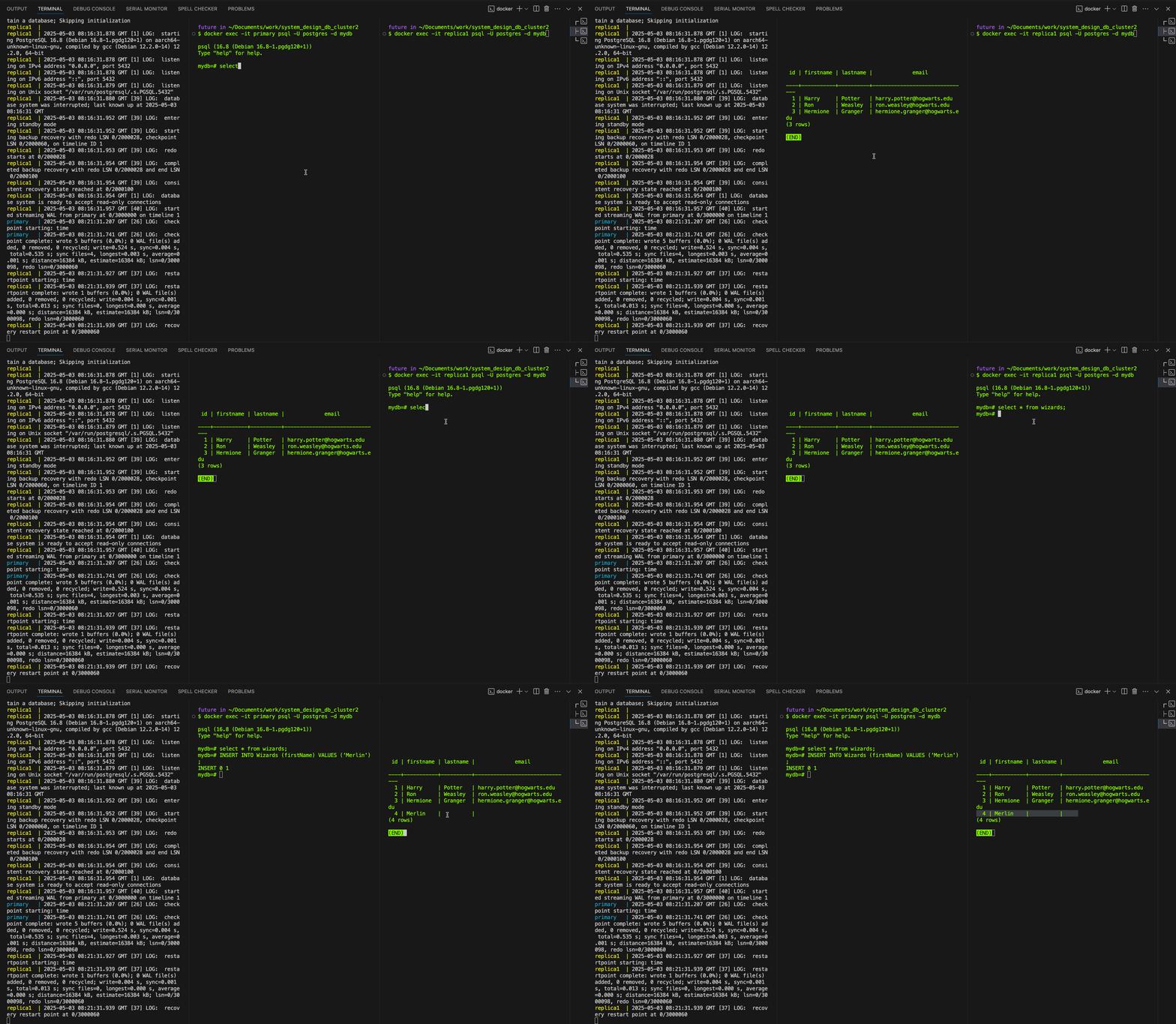
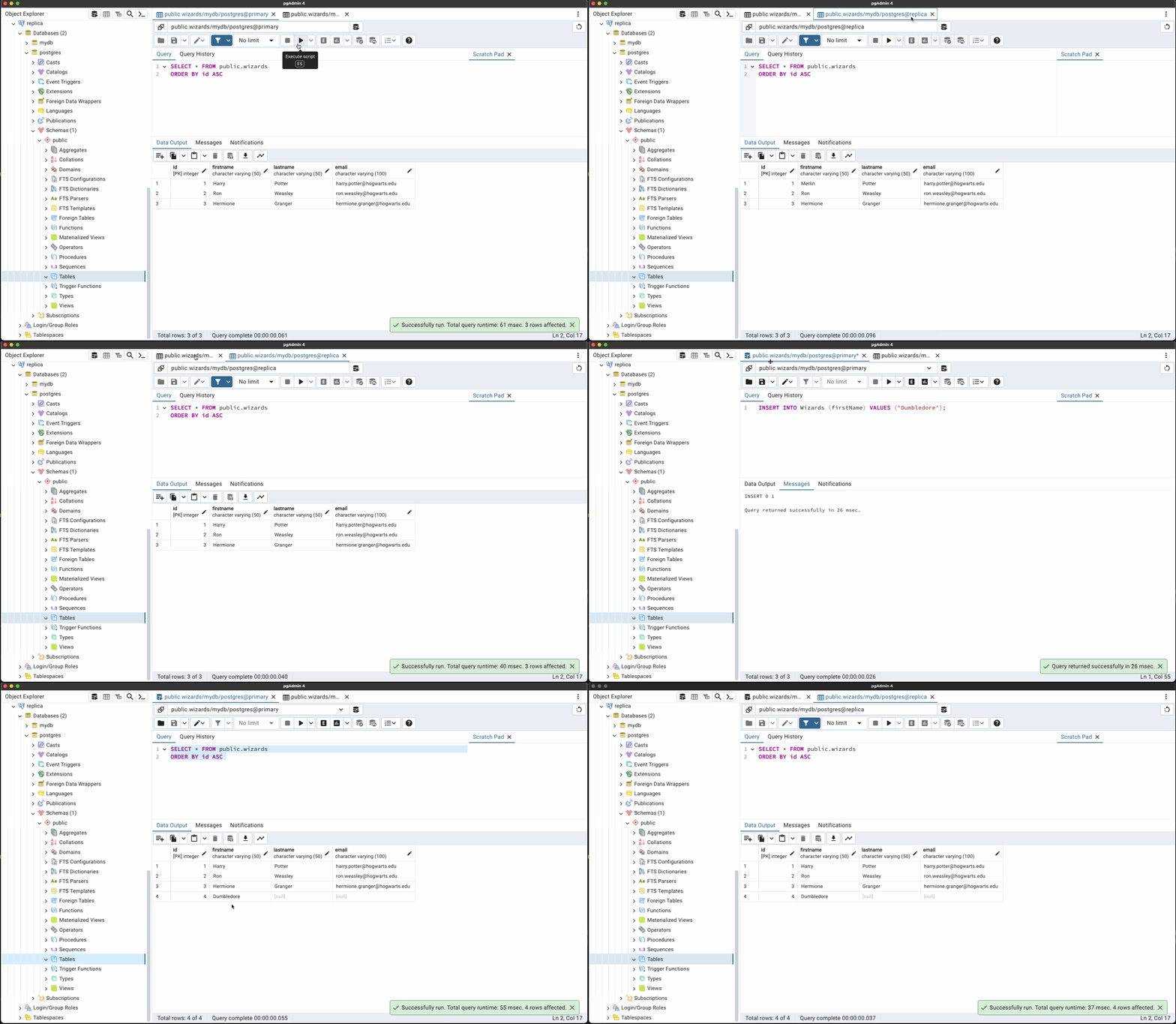
Alternatively use PGAdmin, create 2 server connections, and view your tables & schemes in each DB instance.