Introduction
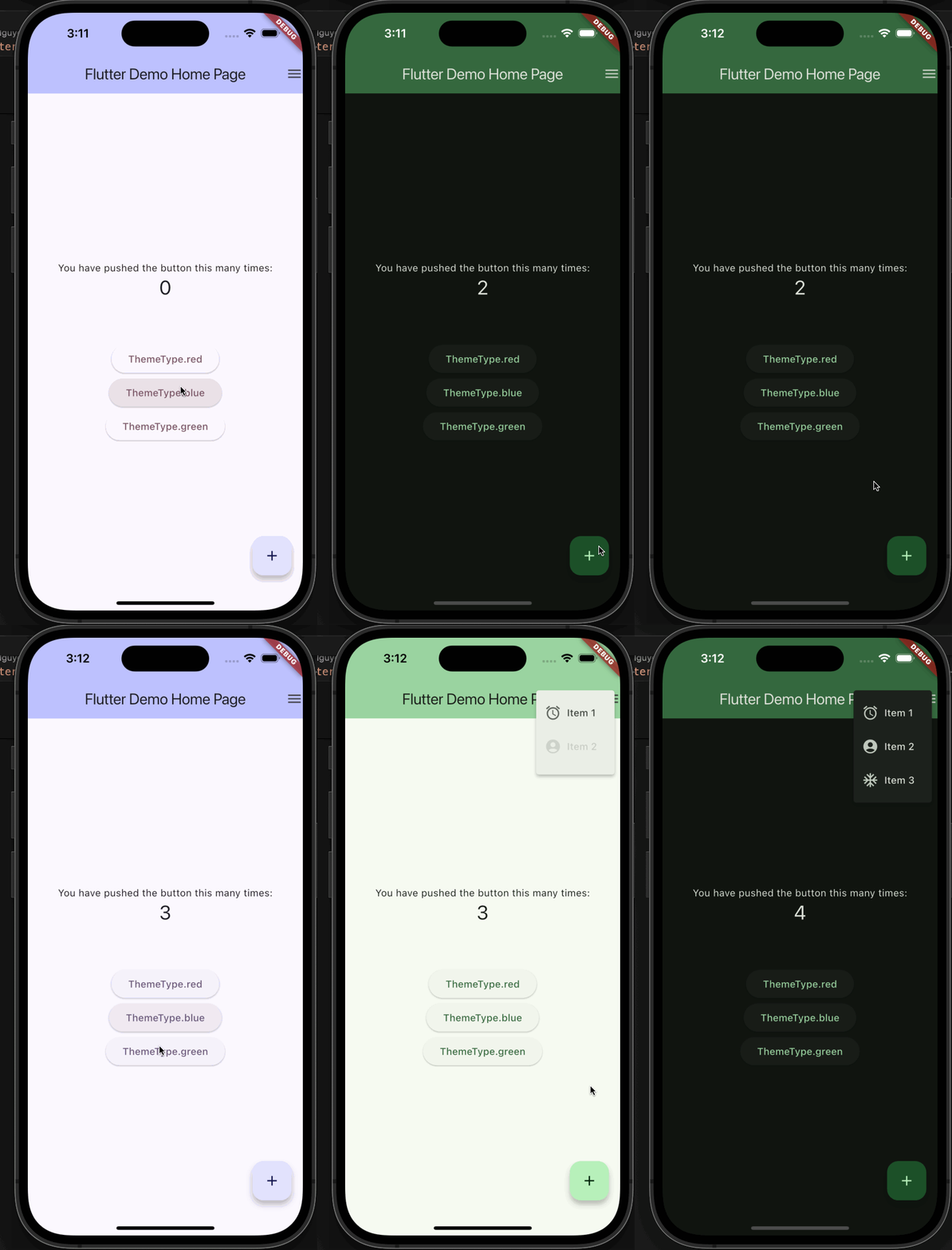
Light & Dark mode's are a common requirement in modern web & mobile apps.
We'll use the following packages to implement this requirement:
We'll also add the ability to dynamically change the theme so that we're prepared for any updates a designer might send our way.
- Define Theme Provider.
- This will hold helper methods to change brightness modes between
lightanddark - It'll notify listeners in the event that a change is detected.
- This will hold helper methods to change brightness modes between
- Add
AppThemeclass which stores theme data.- Store configuration for colors and
enumsfor maintainability.
- Store configuration for colors and
- Utilize
themeProviderinmain.dart- Listen for notifications using
ChangeNotifierProviderand passing it it's required params,create&builder. - Inject the theme into the app by leveraging
MaterialApp'stheme,darkTheme, &themeModeparams.
- Listen for notifications using
1import 'package:flutter/material.dart';2 import 'package:theme_demo/theme.dart';3 4 class ThemeProvider extends ChangeNotifier {5 ThemeMode themeMode = ThemeMode.system;6 7 ThemeData theme = AppTheme.lightBlue;8 ThemeData darkTheme = AppTheme.darkBlue;9 10 void changeTheme(ThemeType themeType) {11 theme = AppTheme.getTheme(themeType);12 darkTheme = AppTheme.getDarkTheme(themeType);13 notifyListeners();14 }15 16 void toggleTheme() {17 themeMode = themeMode == ThemeMode.light ? ThemeMode.dark : ThemeMode.light;18 notifyListeners();19 }20 }1import 'package:flutter/material.dart';2 3 class AppTheme {4 static ThemeData lightBlue = ThemeData(5 brightness: Brightness.light,6 colorScheme: ColorScheme.fromSeed(seedColor: ColorConstants.blue));7 8 static ThemeData darkBlue = ThemeData(9 brightness: Brightness.dark,10 colorScheme: ColorScheme.fromSeed(11 seedColor: ColorConstants.blue,12 brightness: Brightness.dark,13 ));14 15 static ThemeData lightRed = ThemeData.from(16 colorScheme: ColorScheme.fromSeed(seedColor: ColorConstants.red));17 18 static ThemeData darkRed = ThemeData.from(19 colorScheme: ColorScheme.fromSeed(20 seedColor: ColorConstants.red,21 brightness: Brightness.dark,22 ));23 static ThemeData lightGreen = ThemeData.from(24 colorScheme: ColorScheme.fromSeed(seedColor: ColorConstants.green));25 26 static ThemeData darkGreen = ThemeData.from(27 colorScheme: ColorScheme.fromSeed(28 seedColor: ColorConstants.green,29 brightness: Brightness.dark,30 ));31 32 AppTheme._();33 34 static ThemeData getDarkTheme(ThemeType themeType) {35 switch (themeType) {36 case ThemeType.red:37 return darkRed;38 case ThemeType.blue:39 return darkBlue;40 case ThemeType.green:41 return darkGreen;42 }43 }44 45 static ThemeData getTheme(ThemeType themeType) {46 switch (themeType) {47 case ThemeType.red:48 return lightRed;49 case ThemeType.blue:50 return lightBlue;51 case ThemeType.green:52 return lightGreen;53 }54 }55 }56 57 class ColorConstants {58 static const blue = Color(0xFF0000FF);59 static const red = Color(0xFFFF0000);60 static const green = Color.fromARGB(255, 15, 147, 66);61 static const orange = Color.fromARGB(255, 238, 119, 0);62 ColorConstants._();63 }64 65 enum ThemeType { red, blue, green }1import 'package:flutter/material.dart';2 import 'package:provider/provider.dart';3 import 'package:theme_demo/menu_icon.dart';4 import 'package:theme_demo/theme.dart';5 import 'package:theme_demo/theme_provider.dart';6 7 void main() {8 runApp(const MyApp());9 }10 11 class MyApp extends StatelessWidget {12 const MyApp({super.key});13 14 15 Widget build(BuildContext context) {16 return ChangeNotifierProvider(17 create: (_) => ThemeProvider(),18 builder: (context, _) {19 final themeProvider = Provider.of<ThemeProvider>(context);20 21 return MaterialApp(22 title: 'Theme Demo',23 theme: themeProvider.theme,24 darkTheme: themeProvider.darkTheme,25 themeMode: themeProvider.themeMode,26 home: const MyHomePage(title: 'Theme Demo'),27 );28 },29 );30 }31 }32 33 class MyHomePage extends StatefulWidget {34 final String title;35 36 const MyHomePage({super.key, required this.title});37 38 39 State<MyHomePage> createState() => _MyHomePageState();40 }41 42 class _MyHomePageState extends State<MyHomePage> {43 int _counter = 0;44 late ThemeProvider themeProvider;45 46 47 Widget build(BuildContext context) {48 return Scaffold(49 appBar: AppBar(50 backgroundColor: Theme.of(context).colorScheme.inversePrimary,51 title: Text(widget.title),52 actions: const [53 MenuIcon(),54 ],55 ),56 body: Center(57 child: Column(58 mainAxisAlignment: MainAxisAlignment.center,59 children: <Widget>[60 const Text(61 'You have pushed the button this many times:',62 ),63 Text(64 '$_counter',65 style: Theme.of(context).textTheme.headlineMedium,66 ),67 const SizedBox(height: 60),68 Column(69 mainAxisAlignment: MainAxisAlignment.spaceEvenly,70 children: ThemeType.values.map((e) {71 return ElevatedButton(72 onPressed: () {73 themeProvider.changeTheme(e);74 },75 child: Text(e.toString()),76 );77 }).toList(),78 ),79 ],80 ),81 ),82 floatingActionButton: FloatingActionButton(83 onPressed: _incrementCounter,84 tooltip: 'Increment',85 child: const Icon(Icons.add),86 ),87 );88 }89 90 91 void didChangeDependencies() {92 super.didChangeDependencies();93 themeProvider = Provider.of<ThemeProvider>(context);94 }95 96 void _incrementCounter() {97 setState(() {98 _counter++;99 });100 101 themeProvider.toggleTheme();102 }103 }Conclusion
By using a few SDKs and packages we're able to quickly & easily add a modern feature making our app user friendly & flexible.