Introduction
Design a backend API which caches client responses for subsequent requests.
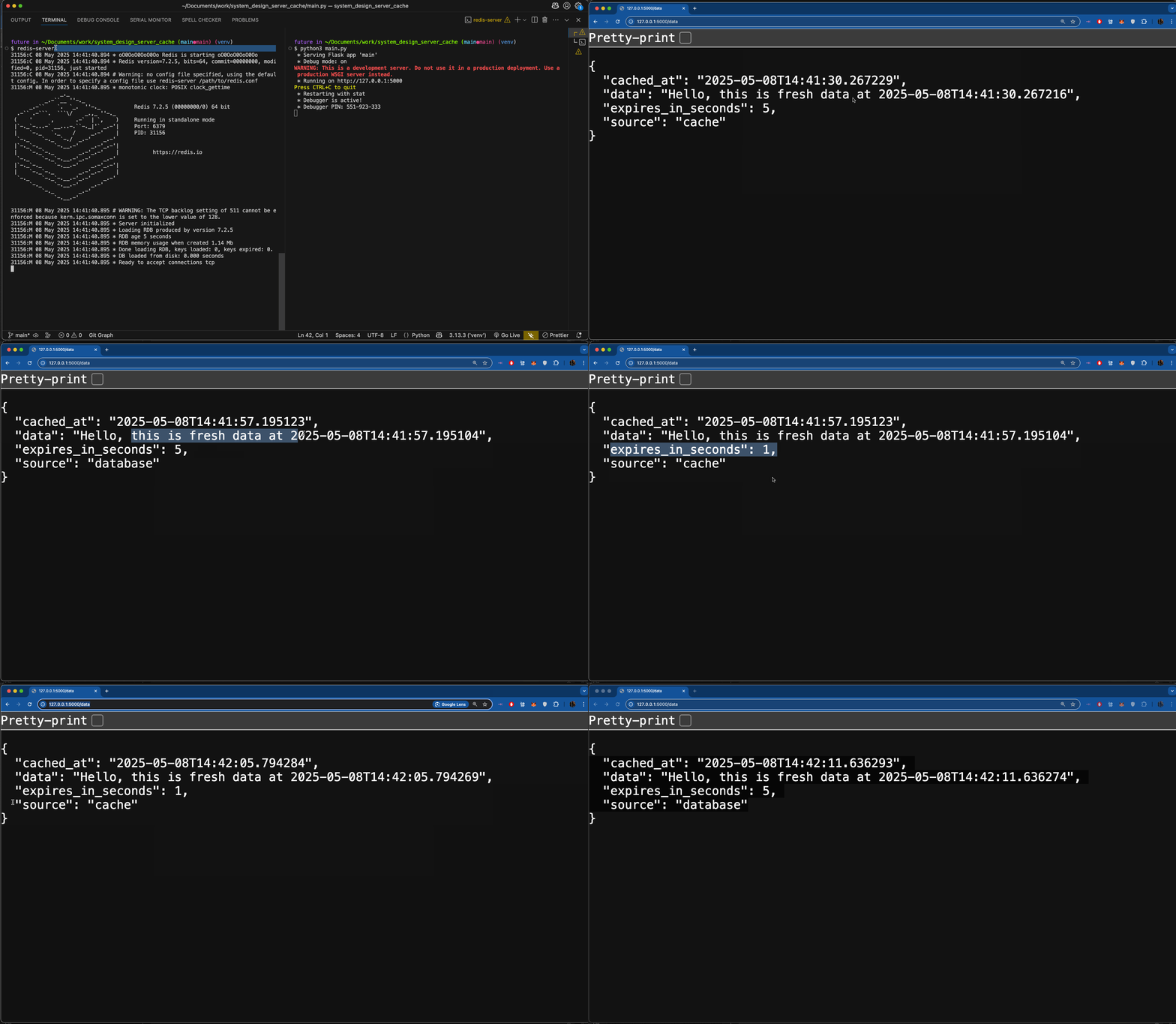
In this post we'll create a simple API endpoint, /data, which serves either fresh or cached data depending on how recently this data was queried.
We'll use Flask & Redis to accomplish this task.
Overview
- Setup Project Repo.
- Install Dependencies.
- Define REST API which serves cached responses.
- Run Redis & Server.
- Check Results.
Implementation
1. Setup Project Repo
mkdir system_design_api_cachecd system_design_api_cache python3 -m venv venvsource venv/bin/activate2. Install Dependencies
pip3 install flask redis3. Define REST API serving cached responses
- 3a. Initialize Cache using Redis:
-
- First we initialize a Redis cache on line
7.
- First we initialize a Redis cache on line
-
- Define
cache_key()which uses the full path of the route as a key on lines11-13.
- Define
-
- Store values in cache using the hashed path/key from line
18on line22.
- Store values in cache using the hashed path/key from line
-
- Set the expiration datetime of this cache entry on line
23.
- Set the expiration datetime of this cache entry on line
-
- 3b. Respond from Cache if possible:
-
- Use
cache.hgetall(key)method to check the cache to use as a response.
- Use
-
- If
cached_responseexists then response with that instead of a newly queried database response.
- If
-
1from flask import Flask, request, jsonify2import redis3import hashlib4from datetime import datetime5 6app = Flask(__name__)7cache = redis.StrictRedis(host="localhost", port=6379, db=0, decode_responses=True)8 9CACHE_TIMEOUT = 510 11def cache_key():12 key = request.full_path13 return hashlib.sha256(key.encode()).hexdigest()14 15 16@app.route("/data", methods=["GET"])17def get_data():18 key = cache_key()19 20 data = {"message": f"Hello, this is fresh data at {datetime.now().isoformat()}"}21 timestamp = datetime.now().isoformat()22 cache.hmset(key, {"message": data["message"], "timestamp": timestamp})23 cache.expire(key, CACHE_TIMEOUT)24 return jsonify(25 {26 "source": "database",27 "data": data["message"],28 "cached_at": timestamp,29 "expires_in_seconds": CACHE_TIMEOUT,30 }31 )32 33 34if __name__ == "__main__":35 app.run(debug=True)1@app.route("/data", methods=["GET"])2 def get_data():3 key = cache_key()4 cached_response = cache.hgetall(key)5 6 if cached_response:7 cache_timestamp = cached_response["timestamp"]8 expiration_time = (9 CACHE_TIMEOUT10 - (datetime.now() - datetime.fromisoformat(cache_timestamp)).seconds11 )12 13 return jsonify(14 {15 "source": "cache",16 "data": cached_response["message"],17 "cached_at": cache_timestamp,18 "expires_in_seconds": max(expiration_time, 0),19 }20 )21 22 data = {"message": f"Hello, this is fresh data at {datetime.now().isoformat()}"}23 timestamp = datetime.now().isoformat()24 cache.hmset(key, {"message": data["message"], "timestamp": timestamp})25 cache.expire(key, CACHE_TIMEOUT)26 return jsonify(27 {28 "source": "database",29 "data": data["message"],30 "cached_at": timestamp,31 "expires_in_seconds": CACHE_TIMEOUT,32 }33 )4. Run Redis & Server
redis-serverpython3 main.py5. Check Results
Open browser and navigate to http://127.0.0.1:5000/data and investigate the JSON response your server gives you.
You should notice a few things:
- If you navigate to the
dataroute you sometimes get a database sourced response and sometimes a cache. - If you navigate to the
dataroute with query string params, appending?foo=barfor example, you'll get newly cached responses.
Conclusion
Redis is a simple key-value data store which can easily handle 1 million read/write operations per second with sub-millisecond latency.
For data we want to cache we append to the Redis cache/database an object under a key of our choosing.
In this case we used a sha256 from Python's hashlib lib. However you don't have to use that algorithm and can use your own.
The cache was wrapped by a minimal Flask REST API which you can learn how to create in this Flask API tutorial.