Introduction
Over the years web frameworks of varying complexity have been developed.
Among these are micro frameworks such as Javascripts's Express, Ruby's Sinatra, & Python's Flask.
They're designed to be minimal & flexible compared to more fully featured frameworks like NestJS, Ruby on Rails, Django, enabling developers to build & ship products much more quickly.
In this post we'll take a look at Flask.
1. Create project directory
mkdir system_design_flaskcd system_design_flask2. Setup virtual environment
python3 -m venv venv3. Source environment
source venv/bin/activate4. Check environment is sourced
env | grep VIRTUAL_ENVYou should see something like the following:
$ env | grep VIRTUAL_ENVVIRTUAL_ENV_DISABLE_PROMPT=1VIRTUAL_ENV=/Users/future/Documents/work/system_design_flask/venv5. Install Flask
pip3 install flask6. Create entrypoint file containing source code
touch app.py7. Create single endpoint and run app
1from flask import Flask2 3app = Flask(__name__)4 5@app.route("/")6def home():7 return "<p>Hello World from Flask!</p>"8 9if __name__ == '__main__':10 app.run(host='0.0.0.0', debug=True)8. Run project from command line
flask runYou should not see something like the following:
$ flask run * Debug mode: offWARNING: This is a development server. Do not use it in a production deployment. Use a production WSGI server instead. * Running on http://127.0.0.1:5000Press CTRL+C to quit127.0.0.1 - - [28/Apr/2025 14:07:36] "GET / HTTP/1.1" 200 -9. Check App works
Open your browser and navigate to the URL printed in the CLI and your browser should now give you a Hello World
10. Add Route for Creating Data Server Side
1from flask import Flask, request2 3app = Flask(__name__)4 5@app.route("/")6def home():7 return "<p>Hello World from Flask!</p>"8 9wizards_list = ['Harry', 'Ron', 'Hermione']10 11@app.route("/wizards")12def wizards():13 name = request.args.get('name')14 if name:15 wizards_list.append(name)16 wizards_html = ''.join([f"<p>Hello {wizard} is a wizard of system design with Flask!</p>" for wizard in wizards_list])17 return wizards_html18 19if __name__ == '__main__':20 app.run(host='0.0.0.0', debug=True)Now we're reading from our query string the key name and it's value. If it's there then we'll append that name to our list of wizards.
You may need to restart your server with ctrl-c and then running the app again flask run.
11. Test new endpoint
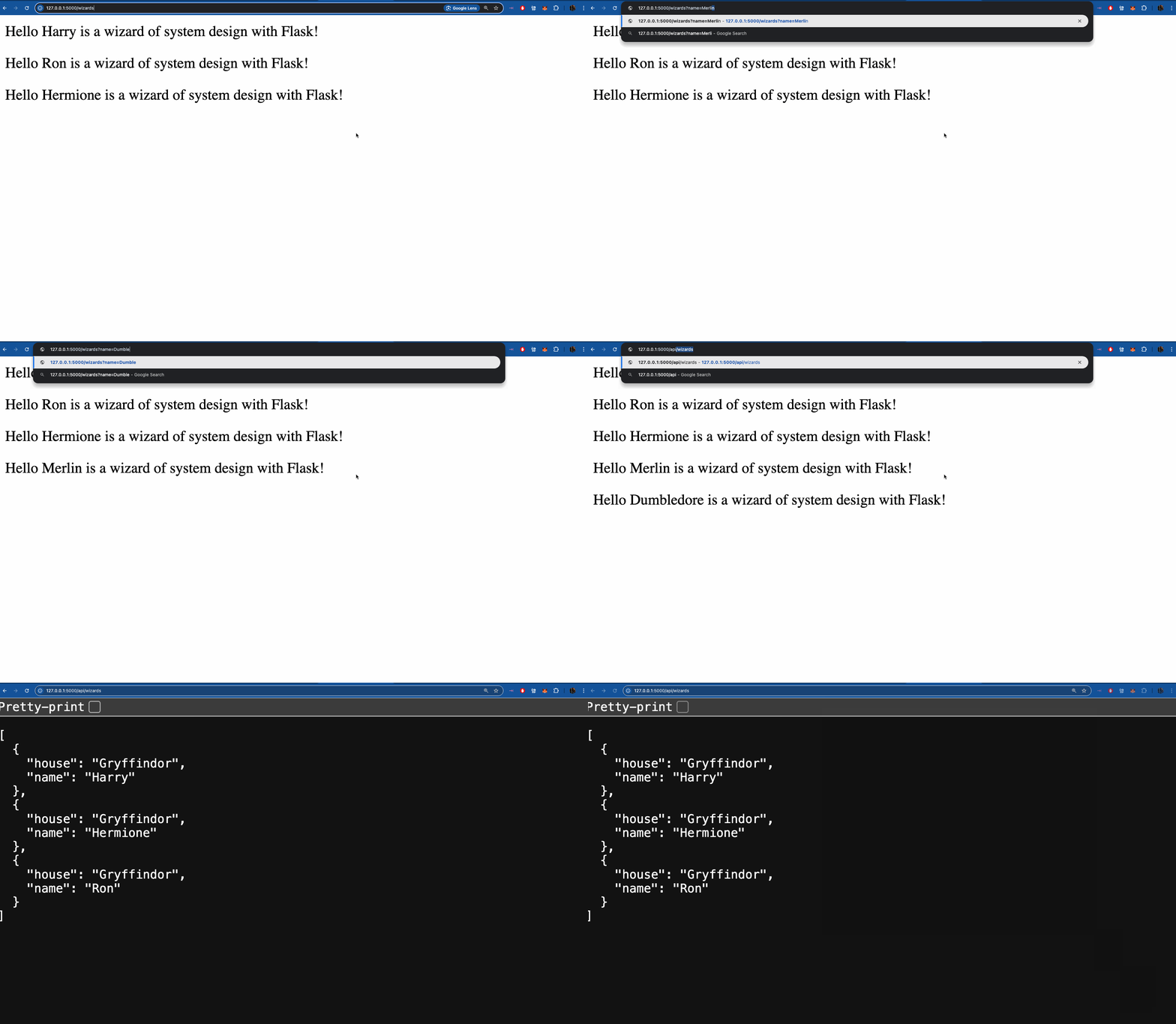
Navigate to http://127.0.0.1:5000/wizards and pass in a query param, ?name=Merlin
You should now see that Merlin is appended to our list of wizards.
12. Add JSON API Route
1from flask import Flask, request, jsonify2 3app = Flask(__name__)4 5@app.route("/")6def home():7 return "<p>Hello World from Flask!</p>"8 9wizards_list = ['Harry', 'Ron', 'Hermione']10 11@app.route("/wizards")12def wizards():13 name = request.args.get('name')14 if name:15 wizards_list.append(name)16 wizards_html = ''.join([f"<p>Hello {wizard} is a wizard of system design with Flask!</p>" for wizard in wizards_list])17 return wizards_html18 19@app.route('/api/wizards', methods=['GET'])20def get_wizards():21 wizards = [22 {'name': 'Harry', 'house': 'Gryffindor'},23 {'name': 'Hermione', 'house': 'Gryffindor'},24 {'name': 'Ron', 'house': 'Gryffindor'},25 ]26 27 return jsonify(wizards)28 29if __name__ == '__main__':30 app.run(host='0.0.0.0', debug=True)Now when you navigate to http://127.0.0.1:5000/api/wizards you'll get a JSON response.
Additional
Deactivate environment
Deactivate the environment when you're done working with this project so that python doesn't trip elsewhere.
deactivateAdd Hot Reload
You'll notice that if you change code and it's not reflected on browser refresh then updating an environment variable might fix the issue.
export FLASK_DEBUG=1You'll know it works if you see Debug mode: on in your console's output.
1future in ~/Documents/work/system_design_flask (venv)2$ flask run3 * Debug mode: on4WARNING: This is a development server. Do not use it in a production deployment. Use a production WSGI server instead.5 * Running on http://127.0.0.1:5000Conclusion
Flask makes it a piece of cake to develop APIs.
We designed a Backend API using Flask in the following way
- Creating & sourcing a python environment.
- Defined app entrypoint
app.py - Defined 3 routes.
/: A canonicalHello Worldroute./wizards: A route for displaying a list of wizards & adding if passed anamekey and it'svalue./api/wizards: A route for returning JSON to clients which is more flexible than raw HTML.
Learn how to cache responses using Redis with this server-side cache tutorial.